


.svg)

Overview
Every click and every conversion in Everflow gets its own ID. You'll see these IDs in API responses, postback payloads, webhooks, and reports. Knowing which is which keeps your attribution accurate and your dedupe logic correct.
The two identifiers
EF.click, or server-side /clk call).EF.conversion, postback URL, or /networks/reporting/conversions/create).Both IDs are 32-character hexadecimal strings (e.g. 868c44c49aad4c8d9091b7a2a74c716c).
How they relate
One transaction_id can be associated with multiple conversion_ids. A single click can lead to:
Each one generates its own conversion_id, but they all share the same transaction_id because they're attributed to the same original click.
An everyday example
Imagine a shopper sees an Instagram post from one of your partners, taps the link, and lands on a sneaker store. That tap creates the transaction_id — let's call it abc123. Now follow what happens next:
transaction_id abc123def456 (base sale).ghi789.jkl012.mno345.Four conversions, four conversion_ids, all sharing the same transaction_id abc123 — because they all trace back to that one Instagram tap. The partner who drove the original click gets attribution for every one of them. For a deeper look at how to model multi-step flows like this, see Practical Funnels Using Additional Conversion Events.
Deduplication
conversion_id is the unique row identifier. Using transaction_id as the dedup key will collapse legitimate additional events, upsells, and recurring billing rows into one — you'll silently lose data.SQL examples
-- Correct
SELECT * FROM conversions WHERE conversion_id = 'def456...';-- Wrong — will miss upsells and post-events
SELECT DISTINCT ON (transaction_id) * FROM conversions;Getting a transaction ID
The transaction_id is only generated by a click. You can't derive or construct it from an offer ID + affiliate ID combination, and there's no API that returns a transaction ID for a given offer/affiliate pair without a real click happening.
How to obtain one
You obtain a transaction_id in one of these ways:
?transaction_id=... when you use the {transaction_id} macro in the offer's destination URL. See Introduction to Tracking Links & Click Tracking and Choosing A Click Tracking Type.EF.click({...}).then(id => ...). See Understanding Tracking With The JavaScript SDK for the conceptual overview, or the Click Tracking SDK reference for the API.GET /clk?oid=...&affid=.... See Understanding Tracking With Server To Server Postbacks and the Server-Side Click Tracking reference.EF.getTransactionId(offer_id) — retrieves the most recent transaction ID stored in the user's browser for a given offer. See Click Tracking SDK → Helper Methods.&async=json to a standard tracking link (e.g. https://your-tracking-domain.com/aff_c?oid=OFFER_ID&affid=AFFILIATE_ID&async=json) returns the click metadata as JSON instead of redirecting, including the transaction_id. Useful when you need the ID server-side without a browser redirect.transaction_id is the identifier for that click forever. Firing the same conversion twice with the same transaction_id + event_id combination may be rejected as a duplicate — this depends on the offer's allow_duplicate_conversion setting.Using the transaction ID on conversions
When you fire a conversion, passing transaction_id explicitly is the most reliable form of attribution:
JavaScript SDK example
// JavaScript SDK
EF.conversion({
  offer_id: 1,
  transaction_id: EF.getTransactionId(1),
  amount: 49.99
});
Server-side postback example
# Server-side postback
curl "https://www.your-tracking-domain.com/?nid=1&transaction_id=abc123...&event_id=2"transaction_id, the SDK falls back to cookie-based attribution (first-party, then third-party on the tracking domain). This is less reliable, especially on browsers with ITP restrictions.For a full conceptual overview of all three ways to fire conversions, see Introduction to Conversion Tracking Methods, Introduction to Conversion Events, and How to Set Up Conversion Events. To verify your postbacks are firing correctly, walk through How To Test Partner Postbacks.
Looking up events for a transaction
To see every base event conversion and additional event attached to a single transaction_id, use the lookup endpoint:
GET /v1/networks/reporting/conversions/transactions/{transaction_id}This returns the full tree of conversion events that share the transaction ID — useful for debugging attribution issues or auditing upsell flows.
Finding IDs in the UI
Most of the time, you'll spot a transaction_id or conversion_id in a report first, then come here to figure out what to do with it. Here's where each ID lives in Core Platform.
Investigator — trace one transaction → full event tree
Investigator is the purpose-built UI for what we just covered with the lookup endpoint: paste a transaction_id in, see every base event conversion and additional event linked to that one click. It's the fastest way to debug an attribution question.
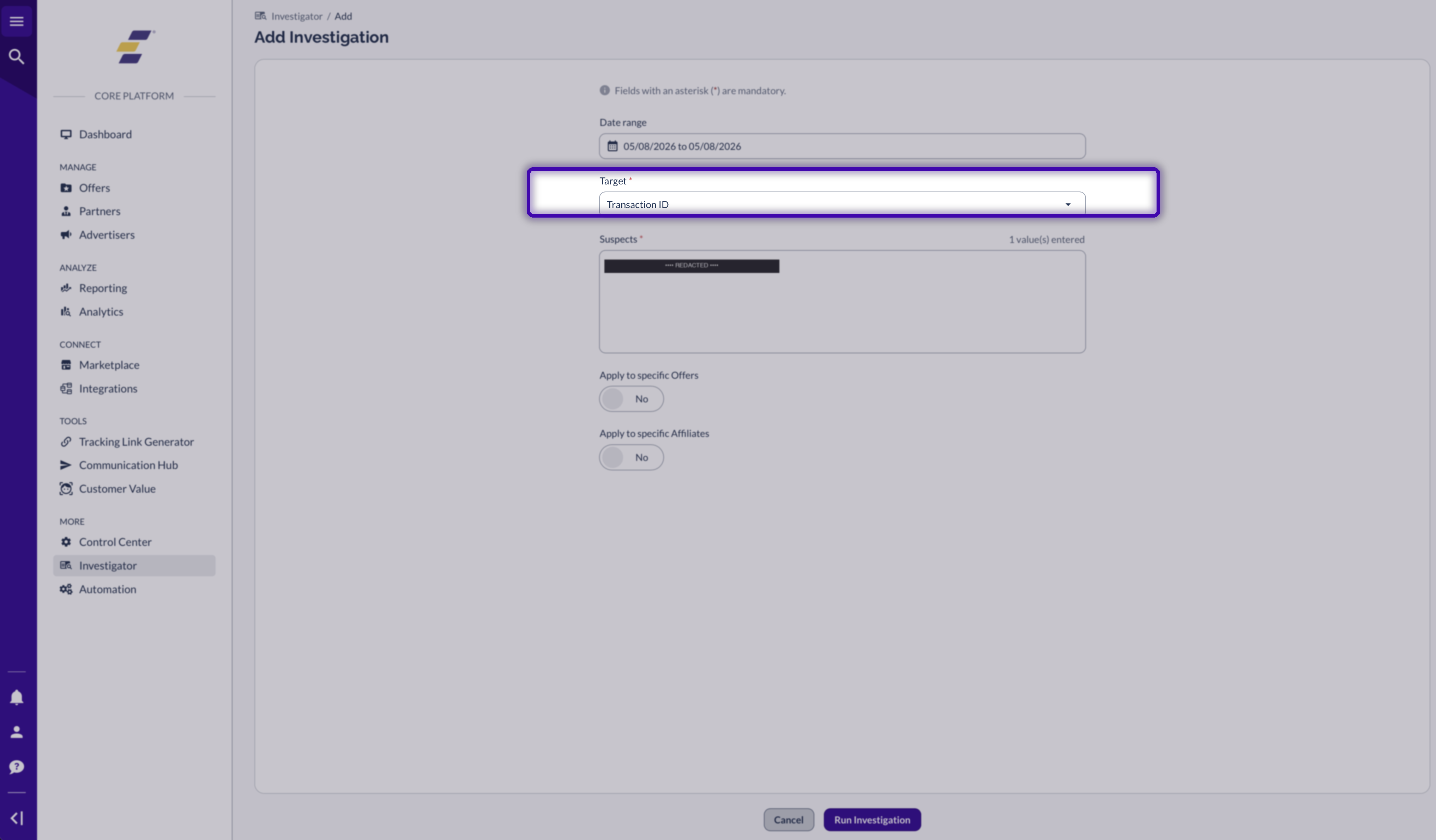
From the left rail, open Transaction ID, and paste the IDs you want to inspect into the Suspects field.
The summary view lists every Click Transaction tied to your suspect IDs, with Offer, Partner, and manager context for each. From there you can click into a row to see the full breakdown:

The flowchart view (click More details on a row) shows the click and every conversion event attached to it — a base sale, any upsells, and any partner postbacks that fired. Each row includes its transaction_id and conversion_id so you can cross-reference back to your own data.

Read more in How To Use Investigator.
Conversion Report — browse all conversions
Each row in Conversion Report is one conversion event — so each row has its own conversion_id plus the parent transaction_id. Filter by date, offer, partner, status, or any sub parameter to narrow down what you're looking for.
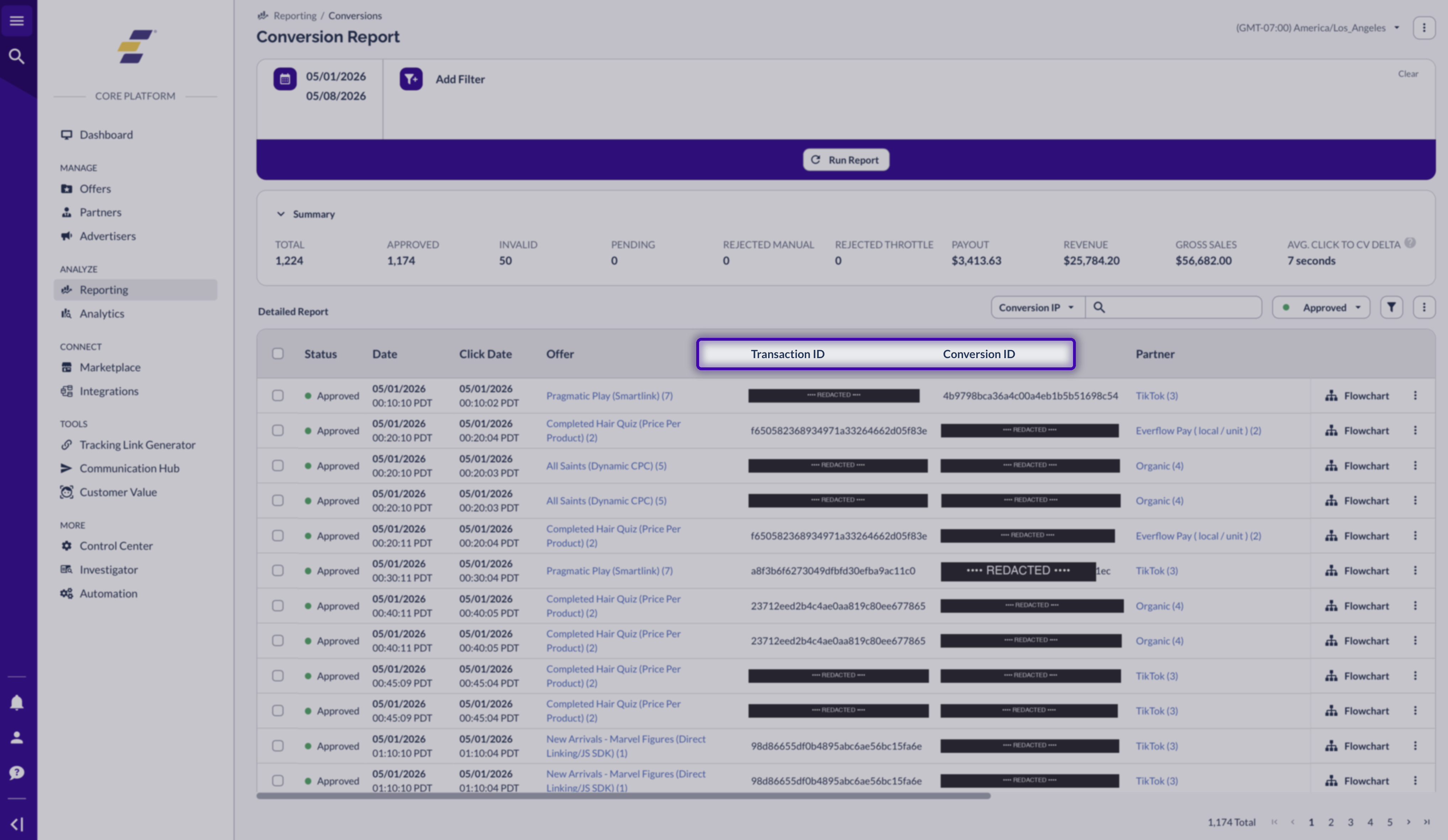
If the Transaction ID or Conversion ID columns aren't showing, open the table-actions menu (the three dots in the top right of the table) and toggle them on under Column Customization. Read more in Conversion Report.
Click Report — browse all clicks
Click Report is the other side of the coin: each row is one click, so each row has one transaction_id. Useful when you have a partial transaction ID and need the full one, or when you're debugging which clicks fired without converting.
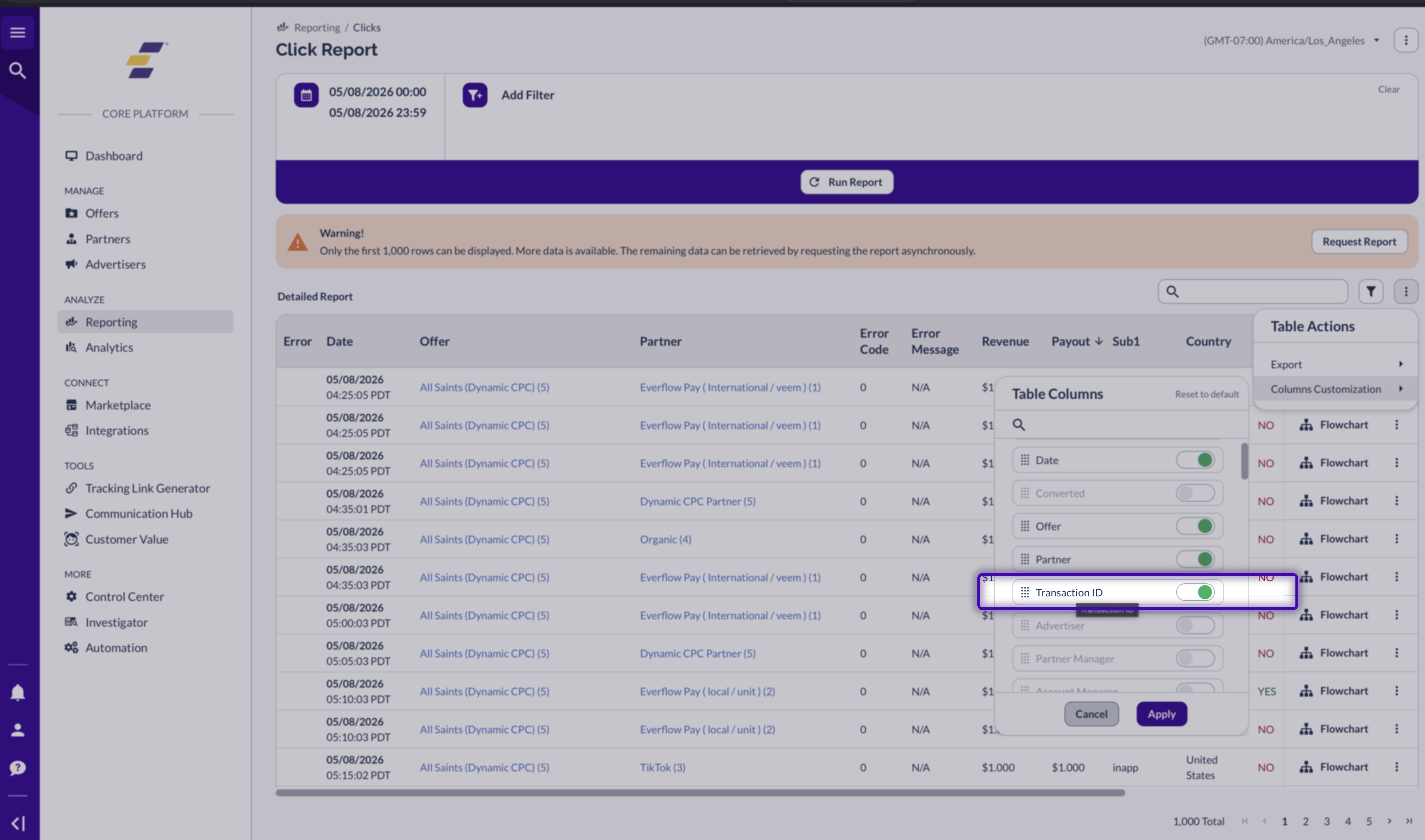
The Transaction ID column is hidden by default. Open the table-actions menu, choose Column Customization, and toggle Transaction ID on:
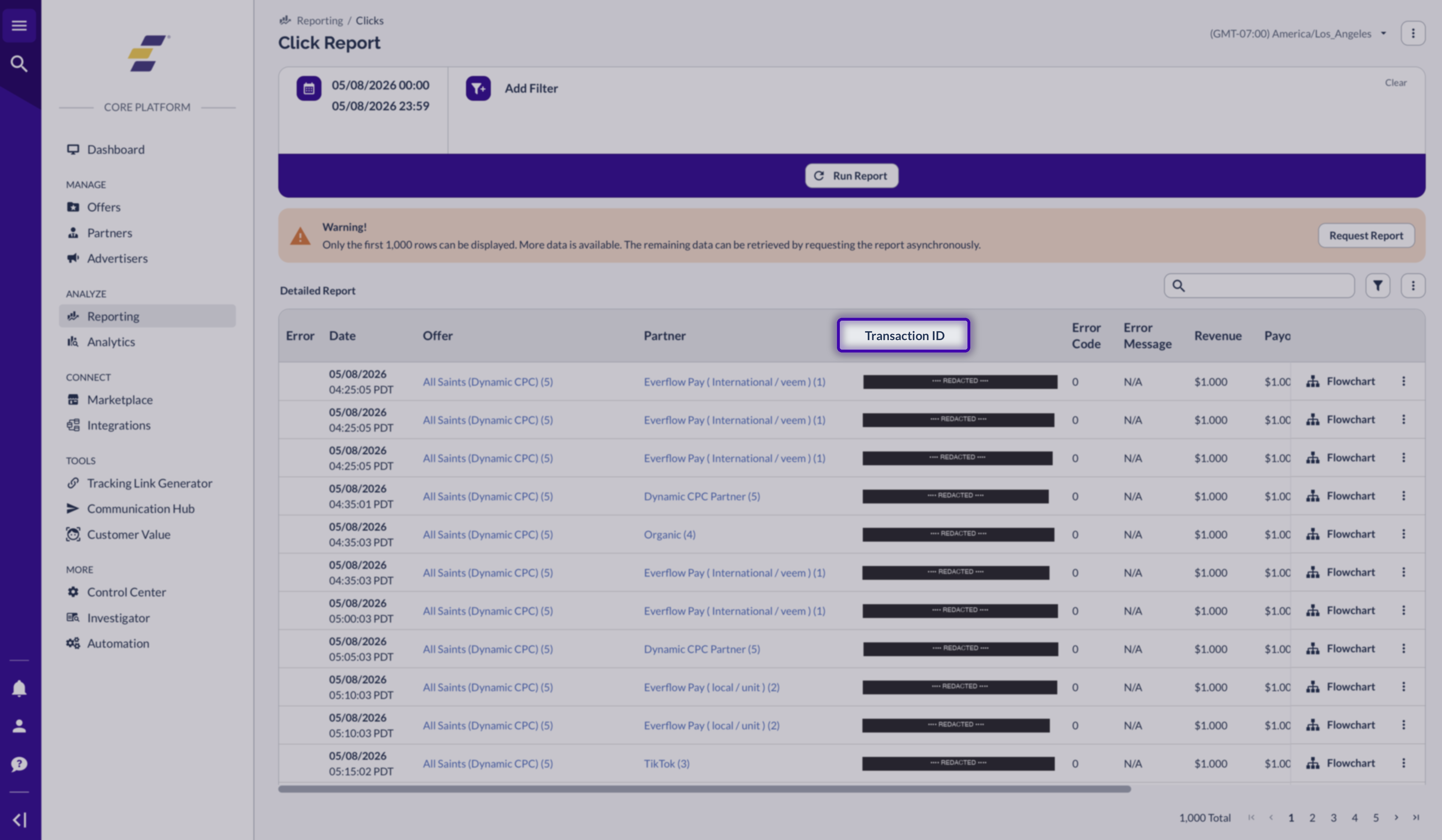
Once enabled, the column shows the full ID for every logged click:
Read more in Click Report.
Filtering by ID
Any report with a transaction_id or conversion_id column supports searching by full ID — paste the 32-char value into the table's search box. Postback Reports also include transaction_id in the URL payload, which is handy when you're debugging why a specific conversion fired (or didn't).
For a deeper look at the funnel-style flows that share a transaction_id, see Funnel Report — it visualizes how one click chains through multiple events (the same shape as the sneaker example above).
Summary
transaction_id = one click. Shared across all conversions attributed to that click.conversion_id = one conversion event. Unique per row.conversion_id.transaction_id explicitly on conversions for maximum attribution reliability.Related help desk articles
If you want the full picture on how clicks, conversions, and tracking methods fit together, these are the next reads:
Tracking fundamentals
Conversion events & funnels
Conversion tracking methods
Technical reference
If you're building an integration that records clicks or fires conversions, head to the developer docs for full SDK references, request/response shapes, and code samples.
SDK references
Endpoint references
Endpoint references for transaction-aware conversion APIs:
transaction_id.transaction_id.


