


.svg)

Introduction
Everflow's Server-to-Server (S2S) Postbacks offer a robust solution for precisely recording conversions, ensuring you and your partners have a clear picture of campaign performance. This method eliminates reliance on browser-based tracking, providing a more reliable and secure way to monitor your affiliate activities.
Let's delve into how these postbacks function and why they're essential for optimizing your tracking and reporting within Everflow.
Why Choose Server-to-Server Postbacks?
Click to compare tracking methods and see why S2S is the modern standard
S2S Postback
-
Browser Required: No — fires from your server
-
Ad Blockers: Immune — server-side only
-
ITP / Cookie Limits: Not affected
-
Offline Conversions: Yes — phone, in-store, CRM
-
App Installs: Yes — via MMP integration
-
Setup: Medium — store Transaction ID
HTML Pixel
-
Browser Required: Yes — user must be on page
-
Ad Blockers: Often blocked
-
ITP / Cookie Limits: Safari 7-day limit, others similar
-
Offline Conversions: No — browser must be open
-
App Installs: No
-
Setup: Easy — paste code on thank-you page
If you're building a new tracking integration, S2S postbacks are the recommended approach. HTML pixels were standard in the early 2010s, but browser privacy changes have made them unreliable for accurate attribution.
📹 Video Walkthrough: Understanding S2S Postbacks
A Reminder On Linking Types
Conversions generally happen after Clicks, and it’s very important to first select your Click Tracking type.
S2S Postbacks is the most reliable method for Conversion Tracking because the postback itself is a direct server-to-server call. It never touches the user's browser.
Redirect Links: The Transaction ID appears in your landing page URL as
_ef_transaction_id. No cookies needed—just grab it from the URL.
Direct Links: The Transaction ID (called "EFTID" in the JavaScript SDK) is stored in a first-party cookie by Everflow. You must use the ClickScript to retrieve it, then store it in your backend before the cookie expires.
Server To Server Postbacks method can be used with any Linking Type, but this Conversion Tracking Method is usually paired with Redirect Links.
How Server-To-Server Postbacks Work
We need to understand S2S postbacks in the entire context of the tracking journey, which means understanding Clicks & then Conversions.
We’ll break down how Direct Links & Redirect Links can both work with S2S Postbacks, but first let’s remind ourselves of the concept of the Transaction ID.
The simple idea is, once a Click has happened, that Click will generate a Transaction ID. This Transaction ID, will be associated with a Partner (usually an Affiliate), and an Offer.
After that, when the conversion happens, you'll fire an Advertiser Postback—a server-to-server call from your backend to Everflow—that reports "this Transaction ID just converted." This call comes from your server, not the user's browser.
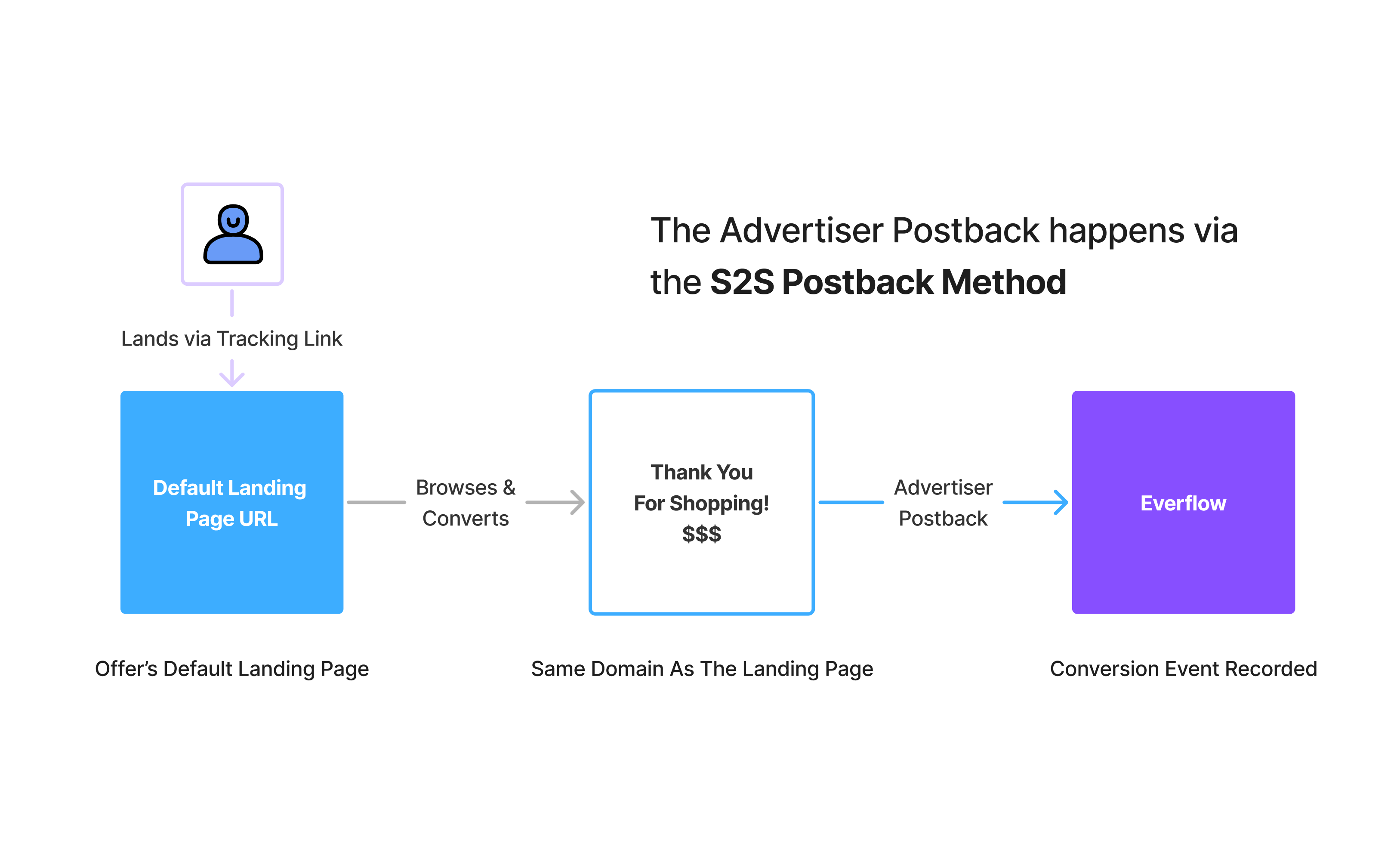
Server-To-Server Postback Format
In order to understand how Everflow associates the Conversion Event included in the Postback to the Partner and Offer, let’s dig into the format of this Postback.
This is the core format for the Advertiser Postback when using the S2S Postback method.
Here’s a breakdown of the example above:
- Tracking Domain: This is basically one of the Tracking Domains that is available to you.
- NID: This is your Customer ID, also known as Network ID (Nid), which will be prefilled when accessing your Postback URL
- Transaction_id: This is the identifier that is created during Click Tracking (or Impressions). The Transaction ID associates this conversion with a Click, Partner & Offer. Connecting the entire attribution funnel.
If your system only supports POST webhooks (common with Authorize.net, Zoho, or custom CRMs), you'll need middleware like Zapier to convert the request.
See our Zapier integration guide →
How To Generate Conversions Using S2S Postbacks
The most important attribute in the Postback is the Transaction ID. It's generated at click time—well before the conversion happens. To tie the conversion back to the original click, you need to:
1. Capture the Transaction ID when the user first lands on your page
2. Store it in your system (Everflow doesn't retain this for you)
3. Send it back via postback when the conversion happens
If your system can't retrieve the original Transaction ID when the conversion happens, the postback will fail and the conversion won't be attributed to the partner.
With Redirect Linking
If your Linking Type chosen for this Offer are Redirect Links, the Transaction ID will be present in the URL once the visitor lands on the Default Landing Page. The URL will look something like this:
Once the visitor lands on the Default Landing Page for the Offer, it’s up to your tech team to fetch the _ef_transaction_id parameter value from the URL & store it.
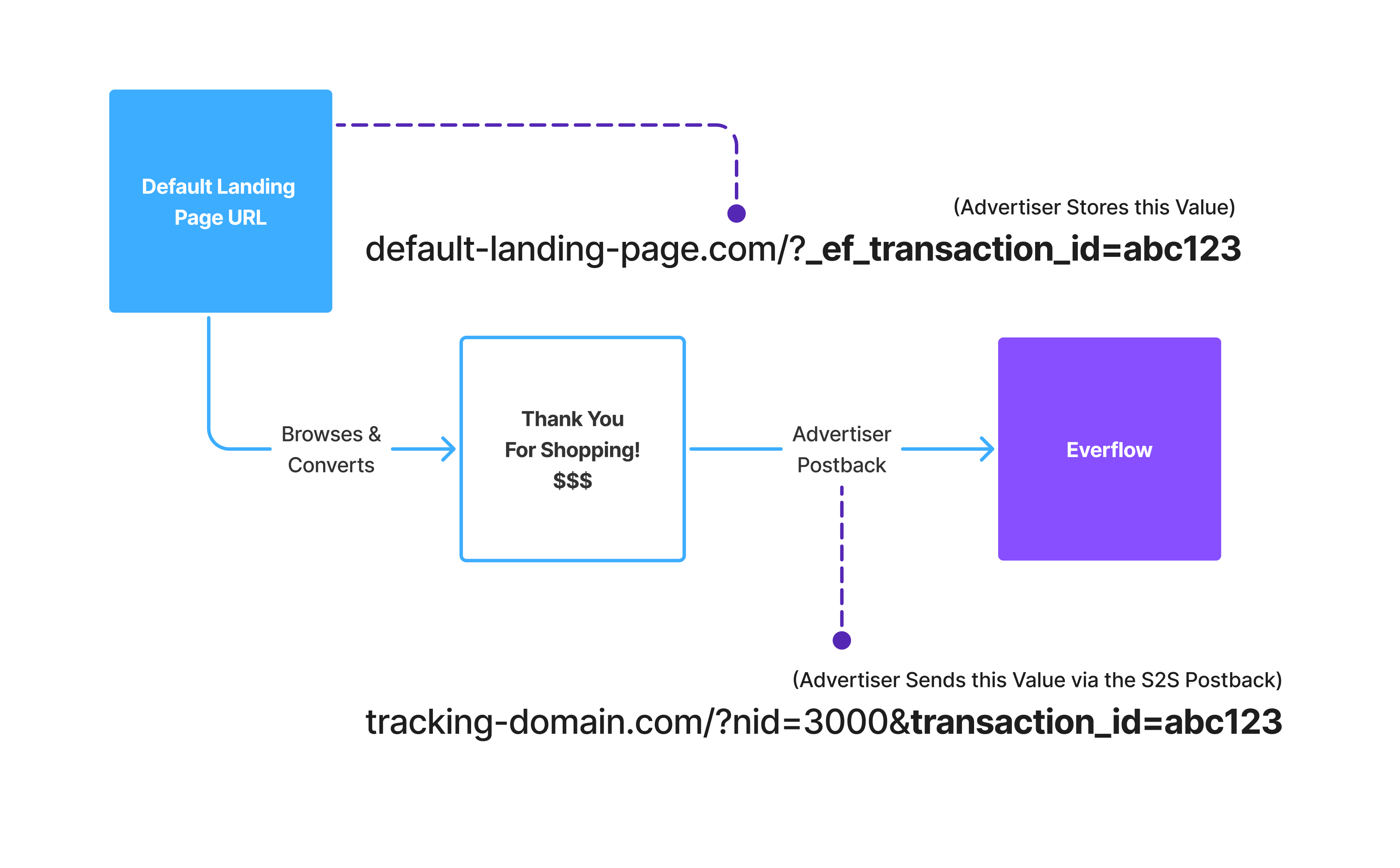
How you store it is up to you, first-party cookie, session storage, or database, but you must store it somewhere. See the storage methods section below for implementation examples.
When the visitor finally converts, you’ll send the Transaction ID value you’d stored earlier, in the Advertiser Postback.
With Direct Linking
If you’re using Direct Linking, once the visitor lands on the Default Landing Page, you will need to use the Click Script from the JavaScript SDK in order to track the Click, which in turn generates a Transaction ID.
Once you call the Click function (1), it will return the Transaction ID via a JavaScript Promise. From there your task is the same as with Redirect Linking, you’ll store that Transaction ID however you want.
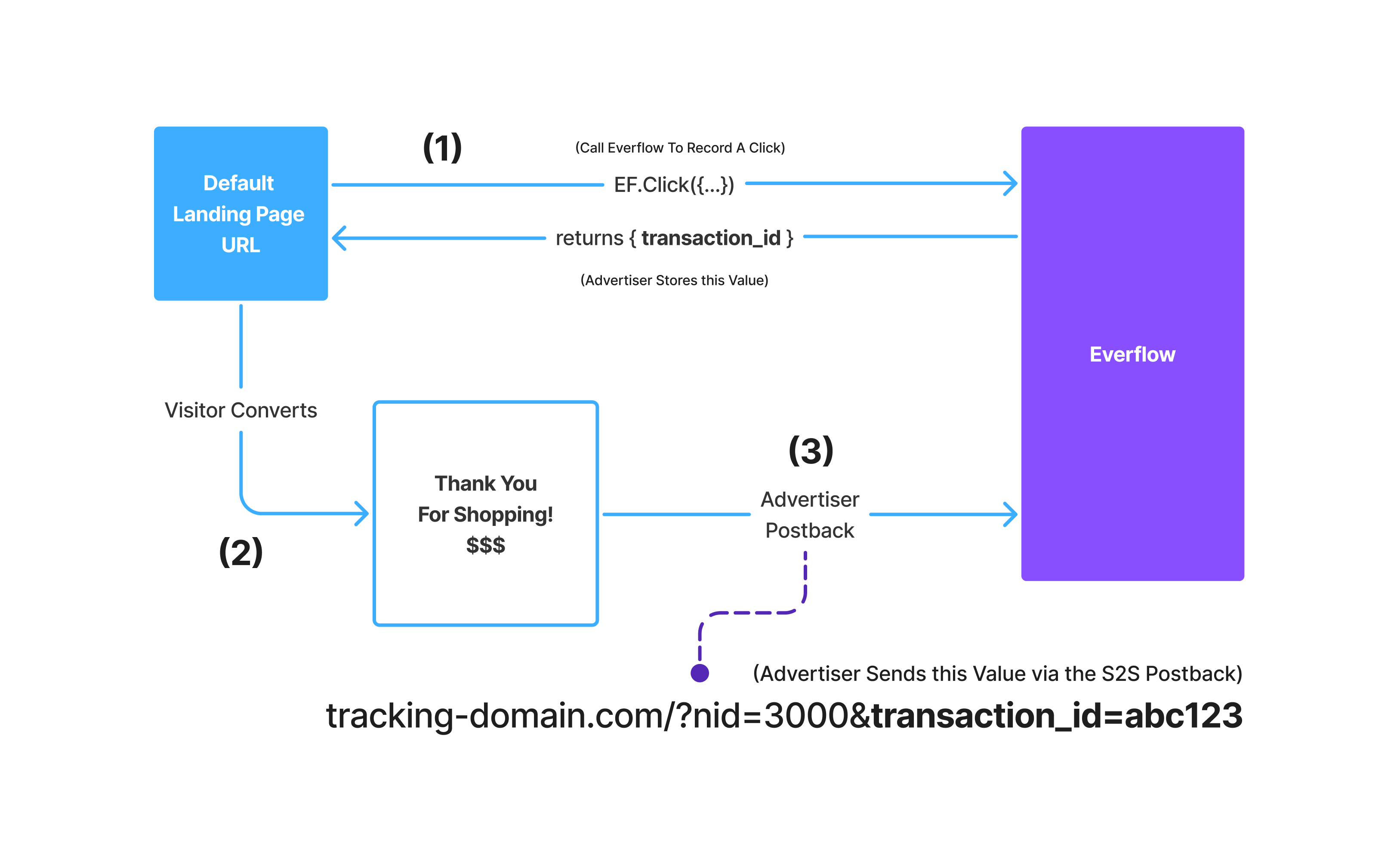
Once the conversion happens (2), you’ll pass the Transaction ID in the Advertiser Postback (3), in the same way as we showed in the Redirect scenario.
How To Store The Transaction ID
Method 1: Hidden Form Fields
Capture the Transaction ID from the URL and inject it into a hidden form field. When the user submits, the ID travels to your CRM with their contact info.
✓ Best for: Lead forms, demo requests, quote formsMethod 2: Session/Cookie Storage
Store the Transaction ID in a session or first-party cookie so it persists as users browse multiple pages before converting.
✓ Best for: E-commerce, multi-step checkoutsMethod 3: Database Storage
For conversions that happen days, weeks, or months after the click, store the Transaction ID in your database alongside the user record.
✓ Best for: Insurance, B2B, subscriptionsE-commerce store? → Cookie/session storage (Method 2)
Long sales cycle? → Database storage (Method 3)
Many businesses use a combination—for example, capturing via hidden field first, then writing to the database for long-term storage.
Important: Data Retention Limits
➔ B2B / Enterprise: Track "Demo Booked" (Day 3) → then "Contract Signed" (Day 120)
➔ SaaS with Trial: Track "Free Trial" (Day 1) → then "Paid Subscription" (Day 45)
➔ Education: Track "Info Request" (Day 7) → then "Enrollment" (Day 90)
By firing a postback for the anchor event, you "lock in" the Transaction ID permanently—Everflow flags it for long-term storage. Additional events can then be tracked against that original click, even a year or more later.
Passing Conversion Level Information To Everflow
The Advertiser Postback is the time & place to send over additional information such as sale amount, currency or any other metadata over to Everflow
Read this article that shows how to access S2S Postbacks and pass any additional information via macros.


