


.svg)

Overview
Partner Postbacks are a crucial component of tracking and attribution in affiliate marketing. This article will guide you through understanding and setting up Partner Postbacks in Everflow.
• The difference between Partner and Advertiser Postbacks
• How Partner Postbacks work in the tracking cycle
• Basic configuration steps to get started
• Where to find detailed setup and troubleshooting resources
Postback Pre-Requisites
A Postback is essentially a “signal” from one entity to another that a Conversion Event has taken place. There’s two types of Postbacks at Everflow:
- Advertiser Postbacks: Conversion Data sent from Advertiser’s webpage/app to Everflow signaling a conversion
- Partner Postbacks: Used to send the above conversion data back to your Partners (Affiliates)
Common use cases:
- E-commerce checkout conversions
- Lead form submissions
- App install or in-app purchase tracking
- CRM-based conversions (delayed attribution)
Common use cases:
- Notifying affiliates about their commissions
- Sending conversion data to partner tracking platforms
- Integrating with affiliate networks (Impact, CAKE, etc.)
- Real-time performance reporting for partners
Understanding The Partner Postback
What Is A Partner Postback?
The Partner Postback is a signal from Everflow to your Partner that they drove a Visitor to a specific Offer, and the Visitor ended up Clicking and/or Converting on that Offer.
How Partner Postbacks Work
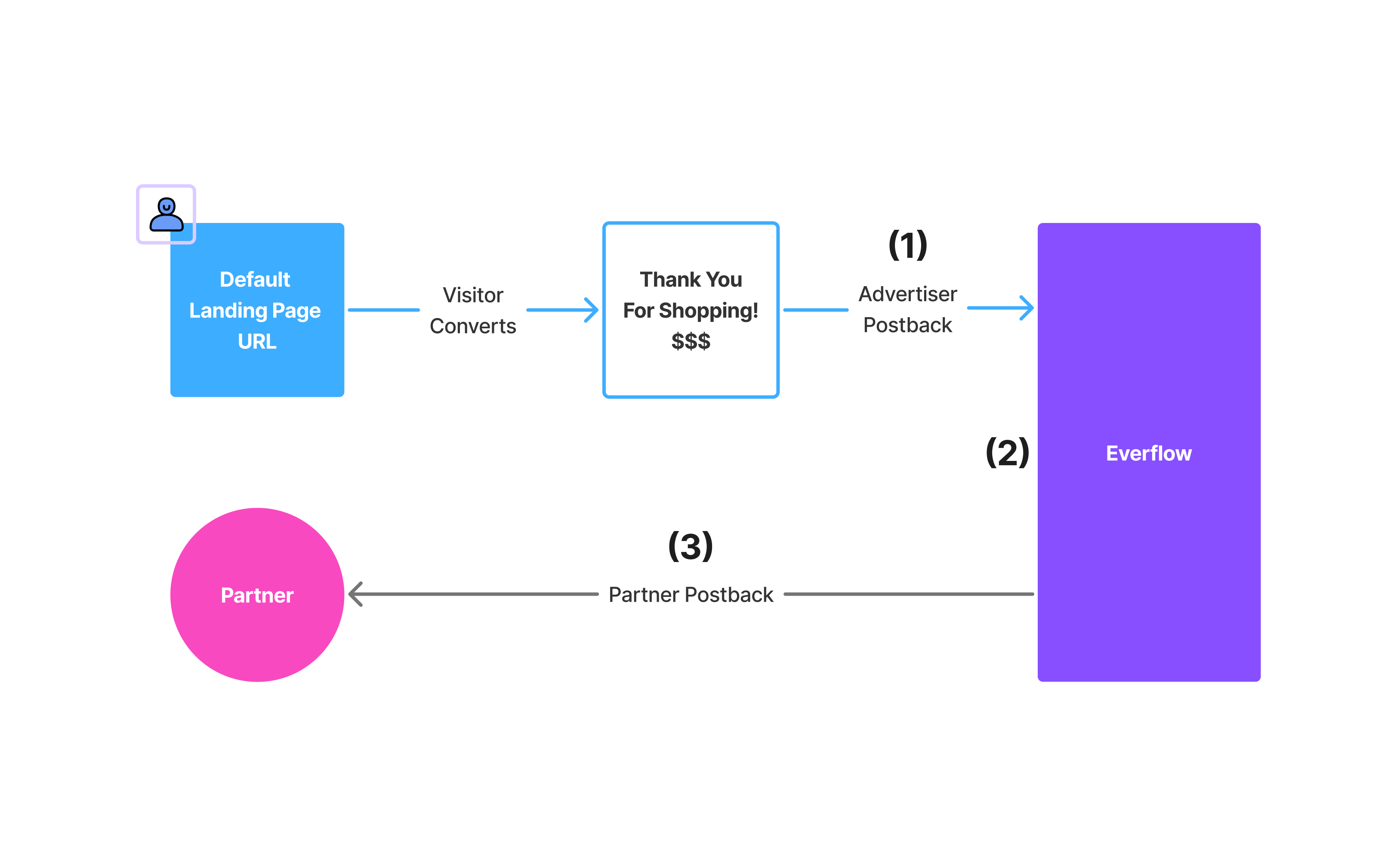
The following diagram explains when a Partner Postback is triggered, in reference to the entire tracking cycle.
• Update the conversion amount
• Change the payout
• Edit conversion details
• Reprocess the conversion
Why this matters: Make sure your postback URL and parameters are correct BEFORE going live. If you need to resend conversion data to a partner, you'll need to coordinate directly with them or use their platform's manual upload features.
As shown above, the Advertiser Postback triggers first. Here’s what happens:
- Everflow receives the signal that a Visitor has converted via the Advertiser Postback
- Everflow attributes the Conversion Event to the correct Partner depending on various attribution settings such as Attribution Priority & previously recorded Click details
- Once a Partner has been attributed, Everflow will then fire off a Partner Postback that signals to the Partner that they drove a Conversion Event
How To Configure Partner Postbacks
In order for Partner Postbacks to be fired, you’ll have to create Partner Postbacks. By default, there are no Partner Postbacks setup in the Core Platform.
You’ll need to make sure for every Conversion Event you’d like to give visibility to your Partners that the Fire Partner Postback setting is enabled.
You can then provide this URL to your advertisers or place it yourself on the advertiser's platform.
Copying A Postback
If you run a lot of postbacks that share the same setup and differ only in the URL, you do not have to build each one by hand. Copy an existing postback and change the one field you need.
Everything from the original comes across, including the delivery method settings for setups like Meta or TikTok.
Parameters and Macros
Parameters and macros are crucial components of postbacks:
- Parameters: These are system variables used to carry information. They appear on the left side of the equal sign in a postback URL.
- Macros: These are placeholders that insert the payload value into the associated parameter. They appear on the right side of the equal sign, usually enclosed in brackets.
Example: transaction_id={transaction_id}
- transaction_id is the parameter
- {transaction_id} is the macro
Next Steps
Now that you understand the basics of Partner and Advertiser Postbacks, you're ready to dive deeper into specific implementation topics:
➔ How To Test Partner Postbacks: Step-by-step guide to testing postback configurations before going live.
➔ Guide to Parameters and Macros: Master the syntax for passing data between systems.
➔ Postback Configurations Cheat Sheet: Quick reference for 20+ platform-specific postback formats.
➔ Conversions Error Code Reference: Troubleshoot conversion tracking issues with detailed error explanations.
Troubleshooting Postbacks
Formatting Postbacks
Ensure you're using the correct format for each partner's postback. Everflow provides a cheat sheet with correct formats for various platforms. Common issues include:
- Using the wrong parameter names (e.g., click_id instead of transaction_id)
- Using incorrect macro formats (e.g., wrong bracket types)
- Typos in parameter or macro names
You can find the cheat sheet in the Everflow Help Desk.
Advertiser Postback Troubleshooting
For advertiser postbacks:
- Ensure you're passing the transaction ID in the Default Landing Page URL.
- Ask your advertiser to implement the postback on their side, as macro formats can vary between platforms.
- Double-check that the advertiser is properly returning the required information.
Bottom Line
By understanding and properly implementing postbacks, you can ensure accurate tracking and attribution in your affiliate marketing efforts. If you encounter any issues or need further clarification, don't hesitate to reach out to Everflow's customer success team.
Re-Firing A Partner Postback
When a Conversion changes status, whether a Partner Postback re-fires depends on whether a postback had already been placed at the time the Conversion was first Approved. The two scenarios below explain the behavior.
Scenario A: No Postback Placed Yet
If a Partner Postback has not yet been placed, the following sequence of events will result in Everflow firing the Partner Postback:
- The Conversion is Approved.
- The Conversion is Rejected.
- The Partner adds a Postback.
- The Conversion is Approved again.
Because no Partner Postback had fired during the first Approved status, Everflow fires it when the Conversion returns to Approved.
Scenario B: Postback Already Placed
If a Partner Postback has already been placed, the following sequence of events will NOT result in Everflow firing the Partner Postback again:
- The Conversion is Approved (Partner Postback fires).
- The Conversion is Rejected.
- The Conversion is Approved again.
On the second Approved status, Everflow will not re-fire the Partner Postback.


