.svg)
Everflow Pay Dashboard Revamp
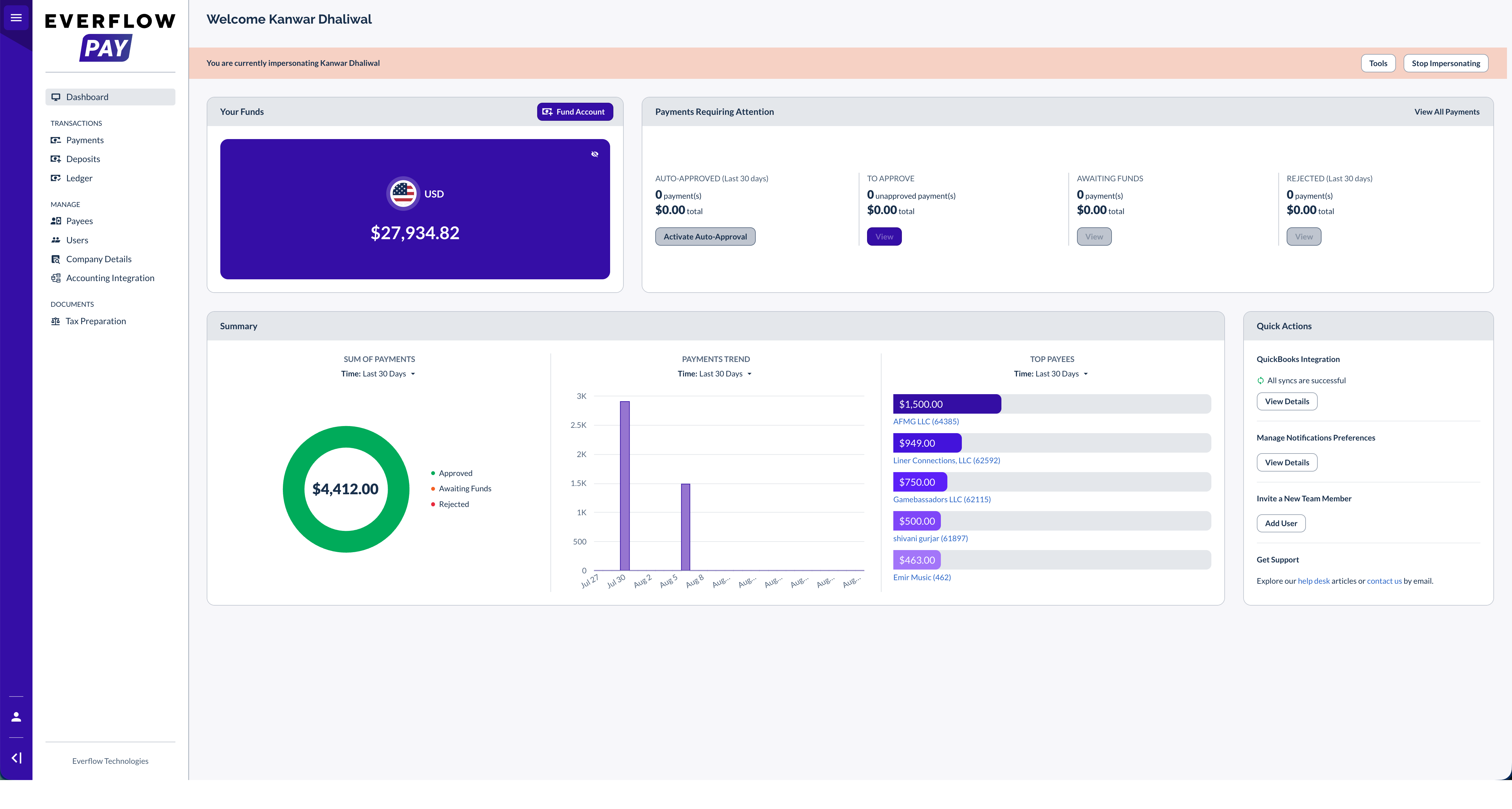
The Everflow Pay dashboard has been redesigned with new visual trends, payment status tracking, and quick action shortcuts to help you manage partner payouts.
The Everflow Pay dashboard has been upgraded to provide deeper intelligence and a more intuitive layout for managing payments. You can now view visual trends, track payment statuses, and access common workflows directly from a single screen. This update helps you monitor your payment patterns and action pending payments more efficiently.
Previously, the dashboard lacked visual representations of monthly or quarterly payment trends. The redesigned interface introduces dedicated cards for funds, payments overview, and summary metrics, supported by flexible date filtering options like the default last 30 days view.
Key Capabilities
- Payments overview tracking: Monitor payments grouped by status, including those requiring approval, awaiting funds, auto-approved, or rejected.
- Payment trend intelligence: Analyze your sum of payments, payment trends, and top payees using customizable date ranges from the last 30 days to the last 12 months.
- Quick action shortcuts: Access key workflows instantly, such as managing accounting integrations, managing notification preferences, inviting new team members, or getting support.
- Funds management: View your funds with an updated user interface.