


.svg)

Overview
First Touch and Last Touch are Attribution Methods associated with each Offer. In this article you’ll learn all about their inner workings.
Understanding The Concepts
Last Touch (Default)
Last Touch attribution is when Everflow attributes the conversion to the Partner who drove the last click before the conversion took place.
How It Works
With Last Touch Attribution (default), the conversion will be attributed to the last Partner to drive the consumer to your site or Offer (via click or impression). It assumes that last exposure was the deciding factor that drove the conversion. This is best used when you have shorter sales cycles or believe the final touchpoints correlate most to driving conversions, so you can optimize towards placements, ads, keywords, etc. that directly preceded purchases or sign-ups. However, it fails to account for assisting factors earlier in the buyer's journey and risks only optimizing bottom-funnel tactics.
First Touch
Attribute the conversion to the Partner who drove the first click before the conversion took place.
How It Works
The First Touch Attribution Method utilizes cookies to track the origin of a conversion. Upon the initial click or impression, a cookie is placed on the user's browser and persists for up to 90 days, or until deleted. If this cookie remains present when a conversion occurs, the originating Partner associated with the cookie is credited with the conversion, regardless of whether a different Partner delivered the most recent click or impression.
A Practical Example
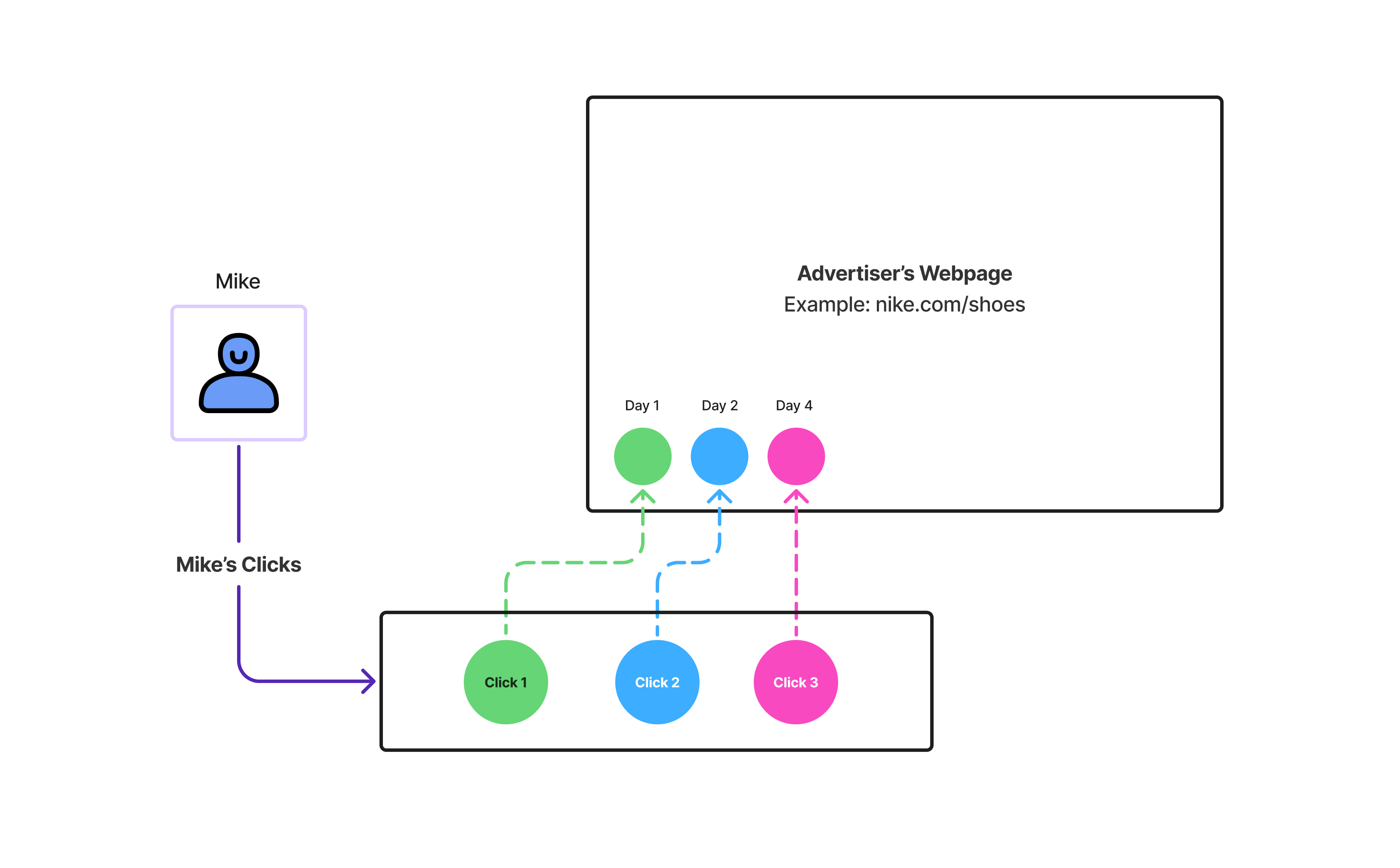
Let’s take a potential buyer for Nike’s Offer named Mike. Here’s some facts:
- Mike makes multiple clicks that lead him to the same offer
- Each click was made via a Tracking Link that was associated with a different affiliate
- For each click, Everflow generates & stores a Transaction ID in a cookie within the browser
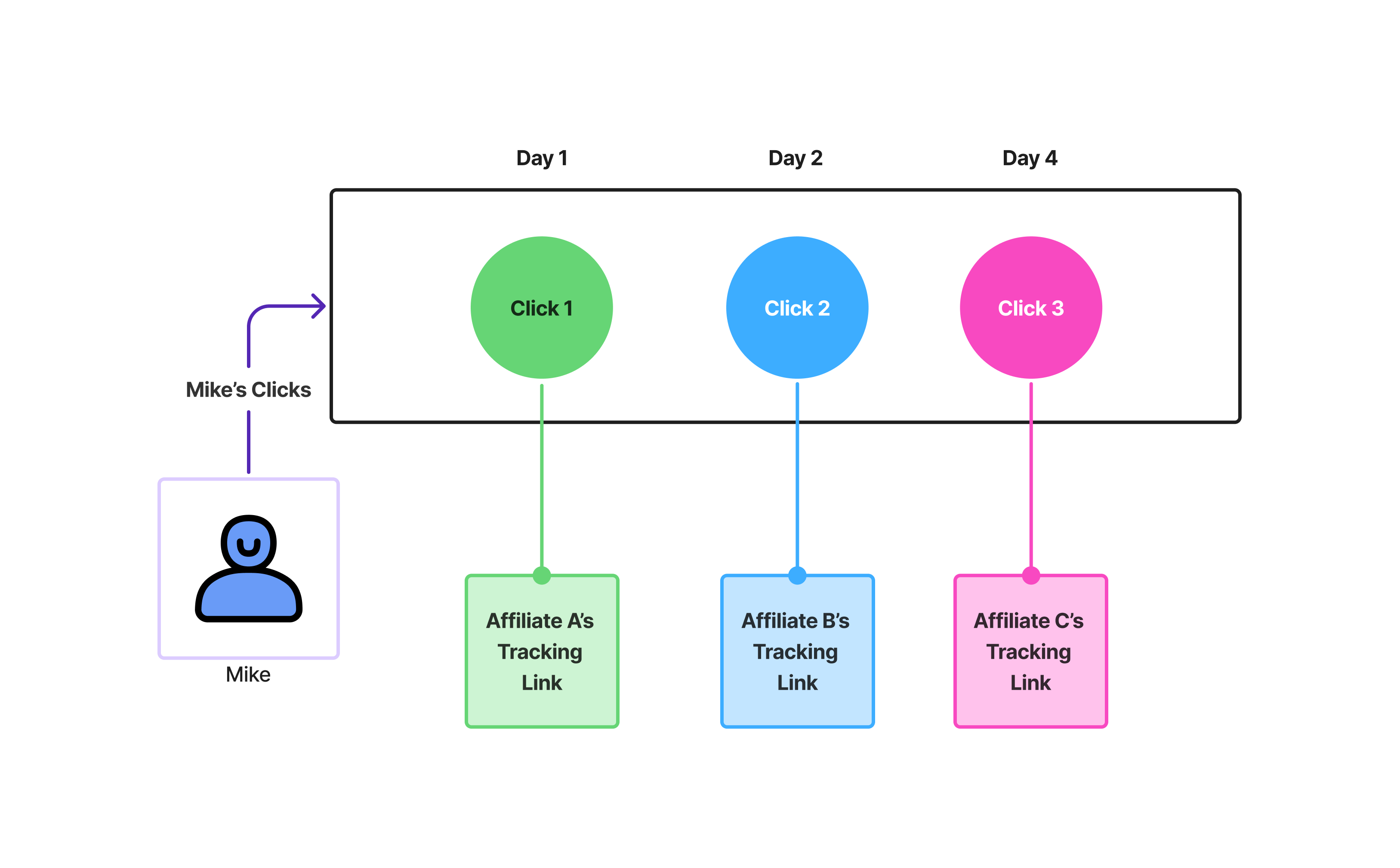
Eventually the last click on Day 4 in the example above, leads to a conversion, which in this case was a sale. The conversion script ends up reading all the cookies stored above and passing on the Clicks (& Impressions) information on to Everflow’s server.
From there, Everflow will do the following:
- If the attribution for this Offer was set to Last Touch, the conversion would be attributed to the Partner (Affiliate) associated with Click 3.
- If the attribution for this Offer was set to First Touch, the conversion would be attributed to the Partner (Affiliate) associated with Click 1.
How To Configure Attribution Method
On The Offer Level
To configure the attribution method at the Offer Level, please complete the following steps:

On The Advertiser Level
To configure the attribution method at the Advertiser Level, please complete the following steps:

How Everflow Decides Which Attribution Setting Applies
You can set an Attribution Method in more than one place, at the Offer Level and at the Advertiser Level. Because of this, Everflow follows a clear priority order based on which identifier the conversion script passes:
Example
Consider an Offer configured as follows:
Question: For a conversion with multiple clicks, does Everflow use the First Touch or Last Touch setting?
Everflow uses Last Touch, because the script passes
The Click Resolution Order
The first stage of any conversion is finding the click associated with it. This resolution logic only comes into play when multiple Transaction IDs are found in the cookie, or when none are found. If there is only a single Transaction ID in the cookie, the steps below are not relevant, since there is only one click to attribute to.
When there are multiple (or no) Transaction IDs, Everflow tests the following steps in order and stops as soon as a click is found:


