


.svg)

What is Tracking?
Every time someone clicks your tracking link and later takes an action — like signing up or making a purchase — Everflow needs a way to connect those two events. That connection is what tracking does.
At its core, tracking answers one question: which partner sent this customer?
Everflow does this by assigning a unique ID to every click. Think of it like a stamped receipt — when the customer eventually converts, that receipt number proves you were the one who sent them.
The Click Journey
Here's what happens behind the scenes every time someone clicks your tracking link.
Redirect Links vs. Direct Links
Not all tracking links work the same way. Everflow offers two types, and the one you use depends on where you're running traffic.
Redirect Link
Your link sends the user through Everflow's server first. The click is logged, a cookie is placed, and then the user is forwarded to the destination.
- Can filter bad traffic before it reaches the advertiser
- Simple to set up — just use the link
- Tiny delay while routing through the server
- Third-party cookies can be blocked by browsers
- Email campaigns
- SMS marketing
- Direct placements
Direct Link
Your link sends the user straight to the website. A small script on the page records the click and stores a first-party cookie — no detour needed.
- Faster — no redirect delay
- First-party cookies resist browser blocking
- Preserves SEO value
- Requires JavaScript on the advertiser's site
- Google Ads, Meta, TikTok, Snapchat
- Any platform that blocks redirects
- SEO-focused campaigns
Here's what each type looks like in the Tracking & Asset Generator. Notice how the Redirect Link generates a URL that goes through Everflow's server, while the Direct Link points straight to the advertiser's site:
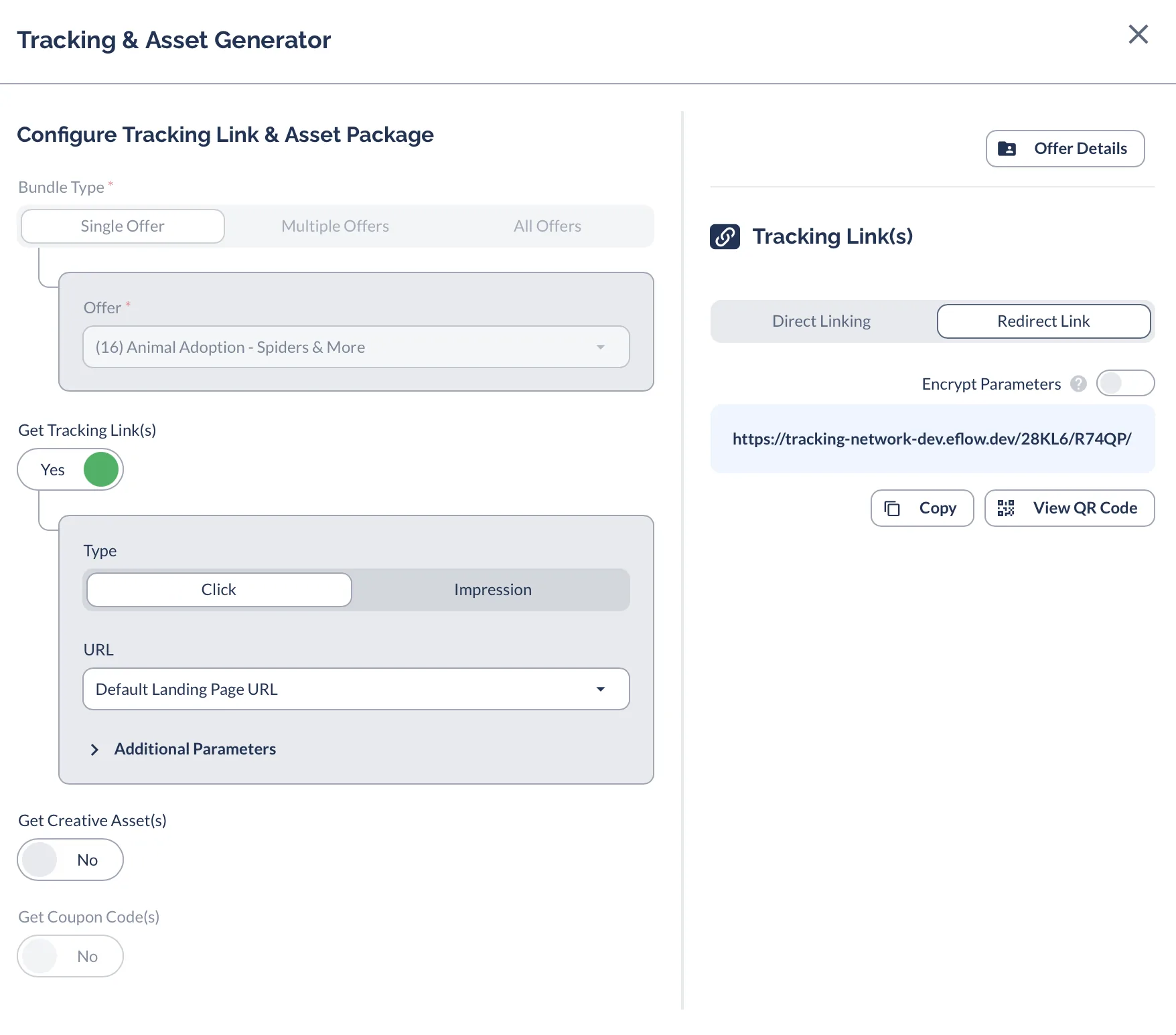
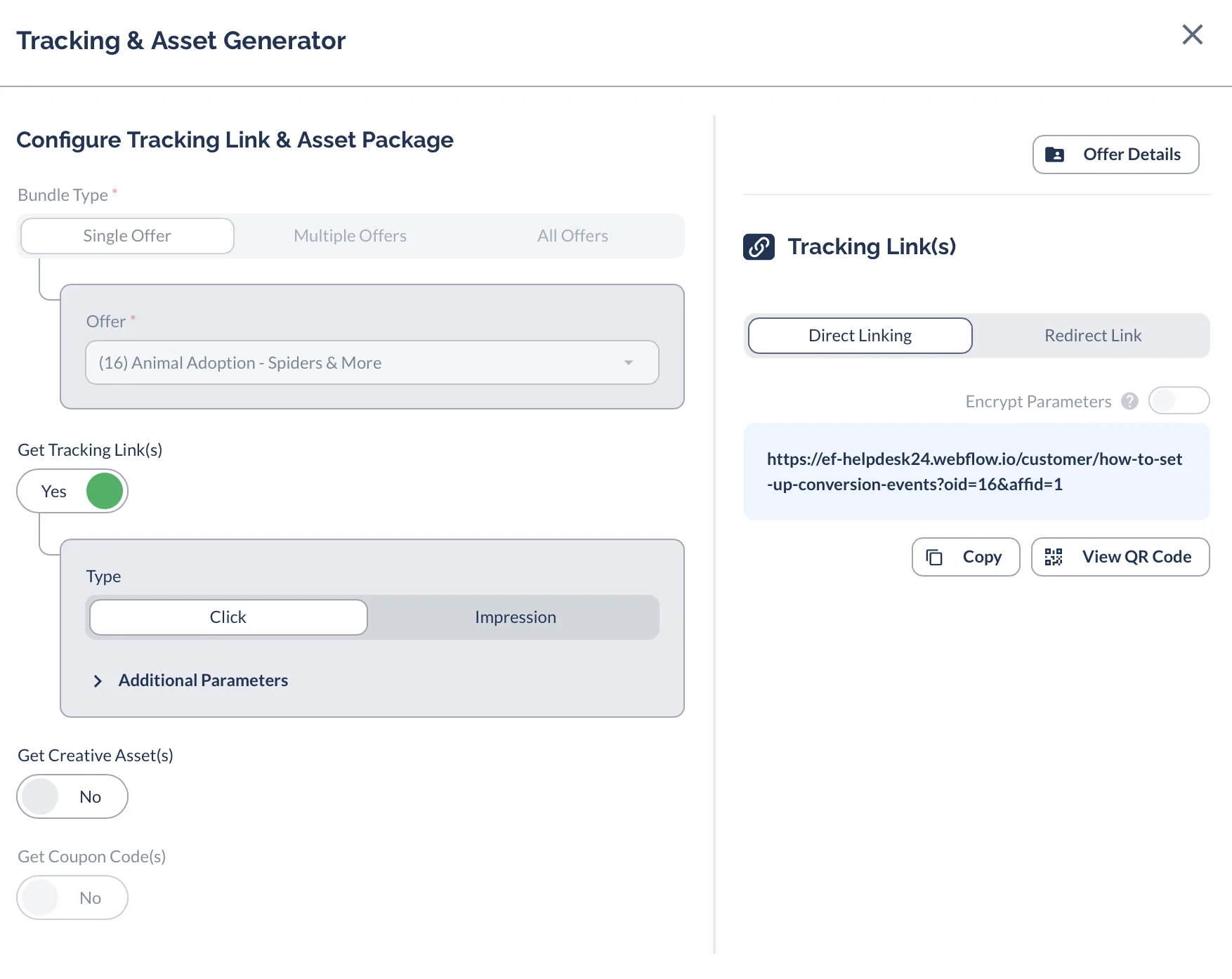
Most partners start with redirect links since they work out of the box. If you're running paid ads on platforms like Google or Meta, your advertiser will typically set up Direct Links for you.
Want a deeper technical look at how advertisers configure redirect vs. direct tracking? See Choosing a Click Tracking Type in the Core Platform documentation.
How Conversions Get Recorded
Recording a click is only half the story. Everflow also needs to know when a user actually converts — and there are two ways that signal gets sent back.
Server-to-Server (S2S) Postback
When a user converts, the advertiser's server sends a secure signal directly to Everflow's server with your unique click ID. No browser involvement — completely invisible to the user.
A secure bank-to-bank wire transfer. The transaction happens entirely behind the scenes between two servers — it doesn't matter what the customer's browser is doing.
Pixel (Client-Side) Tracking
A small piece of code on the "Thank You" page fires when the page loads. It reads the stored cookie and sends the conversion signal back to Everflow through the user's browser.
Checking a receipt at the store exit. If the customer loses the receipt (clears cookies) or leaves before reaching the exit (closes the tab), the conversion is lost.
As a partner, you don't choose the conversion method — the advertiser sets it up on their end. But understanding the difference helps you troubleshoot when conversions seem to go missing.
Why Tracking Sometimes Breaks
Tracking is reliable, but it's not bulletproof. Here are the most common reasons a click or conversion might not show up in your reports.
Ad Blockers
Ad blockers can prevent tracking scripts from running and block cookies from being stored. The click happens, but the system never sees it.
S2S postbacks are immune to this — they bypass the browser entirely.
Cookie Expiration
If a user clicks your link today but converts weeks later, the cookie that connects the two events may have expired or been cleared.
Shorter conversion windows and S2S tracking reduce this risk.
Wrong Link Used
Using a preview URL instead of your actual tracking link means Everflow never records the click. Your traffic shows up as "Others" with no attribution to you.
Always generate links from the Tracking Links section — not the offer preview.
Browser Privacy
Modern browsers like Safari block third-party cookies by default. If your tracking relies on redirect links, the cookie may be blocked automatically.
Direct Links use first-party cookies, which browsers trust and preserve.
Other Ways to Track
Beyond standard click tracking, Everflow supports a few other attribution methods you might encounter:
- View-Through Attribution — A user sees your ad but doesn't click. If they convert later, Everflow can still credit you for the impression. This is common with display and video campaigns.
- Coupon Code Tracking — No click needed at all. The customer enters a unique code at checkout, and that code ties the sale back to you.
- Multi-Event Tracking — Instead of tracking just one action, the advertiser can track multiple steps (signup, first purchase, subscription renewal) as separate events, each with its own payout.
These methods aren't available on every offer — check the offer details or ask your advertiser if you're interested.
Key Takeaways
- Your tracking link is your lifeline — always use the correct one from the Tracking Links section.
- S2S postbacks are more reliable than pixel tracking because they bypass the browser entirely.
- Direct Links are the modern standard for major ad platforms like Google, Meta, and TikTok.
- If something looks off in your reports, start with the basics: did you use the right link? Is the click showing up? See Troubleshooting: Why Isn't My Tracking Working? for a step-by-step guide.
Always test your tracking link in a private or incognito browser window before launching a campaign. Click your link, then check the Click Report to confirm Everflow recorded it. This simple test can save you from untracked traffic and lost commissions.
Related Articles
- Getting Started as a New Partner — Your first 24 hours on the Partner Platform.
- Troubleshooting: Why Isn't My Tracking Working? — Step-by-step guide to diagnosing link and conversion issues.
- How To Get Tracking Links & Creative Assets — Learn how to generate the correct tracking link for any offer.


